Our features

Security & Permissions

We provide our customers with industry-leading security, hosting and permissioning. Discover how Checkbox security features protect your data.

Trusted by over 1000+ companies around the world
Partner Icon
Partner Icon
Partner Icon
Partner Icon
Partner Icon
Partner Icon
Partner Icon
Partner Icon

Control every aspect of your interactions

  • Respondent Access: Create your surveys and forms with password requirements for user to access to complete.
  • Role-Based Access: Provide access to your team members and control down to the specific folders and reports to which they can access.
  • SSO: Leverage single sign-on or Active Directory to ensure that users are on-boarded and off-boarded appropriately.
  • Data Privacy: We adhere to the most rigorous standards and provide hosting options in four regions to meet the needs of our customers.
  • Data Security: Leverage our best-in-class SaaS tool with industry-leading standards or choose to take it even further and run Checkbox on-premise in your own infrastructure.
Checkbox survey software completely meets your needs. It was easy to learn and any questions I have are always easily and clearly answered by the Checkbox support team!
Jamie B.
Marketing coordinator
Features Card Img

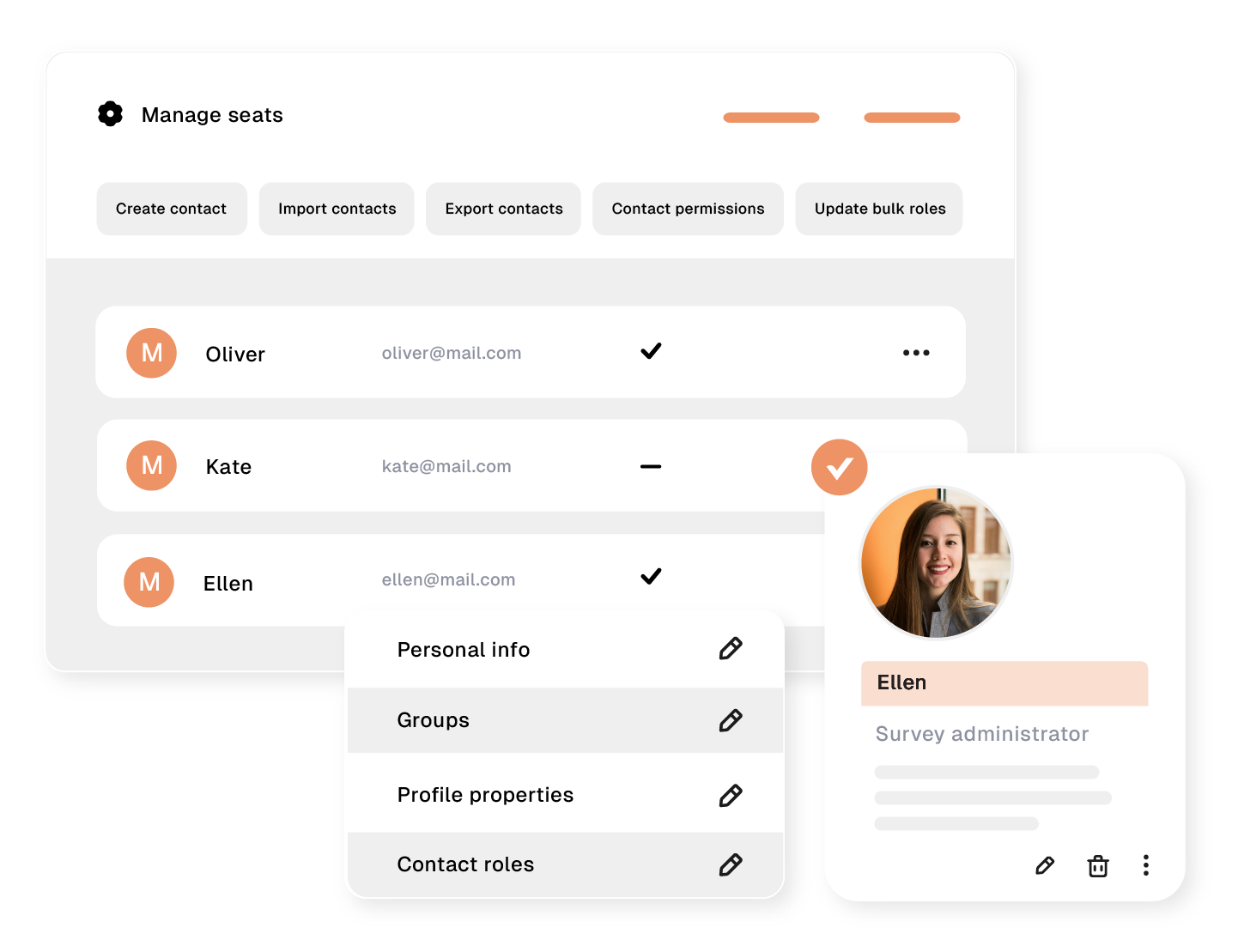
Role Based Access Control

Checkbox allows you to configure how much access each admin user has. User roles control the type of actions an admin user can perform (such as creating a survey or viewing a report). Permissions at the survey, report, or folder level determine which items an admin user has access to. Other than the System Admin, or super-user role, all other admins can only see the items they create, by default. But if you want to share or collaborate with another user on your account, you can simply grant them access to your survey, report, folder, etc. and give them read/write/management access.

Our survey solution's powerful features

Our survey builder has all the features to help you get the actionable insights you need.

Conduct surveys that get critical insights
with these features

No items found.
Get a comprehensive overview
in our live demo
Checkbox develops affordable, feature-rich survey software for organizations, teams, and individuals


Security & Permissions

We provide our customers with industry-leading security, hosting and permissioning. Discover how Checkbox security features protect your data.

Partner Icon
Partner Icon
Partner Icon
Partner Icon
Partner Icon
Partner Icon
Partner Icon
Partner Icon
Partner Icon
Partner Icon
Partner Icon
Partner Icon
Partner Icon
Partner Icon
  • Respondent Access: Create your surveys and forms with password requirements for user to access to complete.
  • Role-Based Access: Provide access to your team members and control down to the specific folders and reports to which they can access.
  • SSO: Leverage single sign-on or Active Directory to ensure that users are on-boarded and off-boarded appropriately.
  • Data Privacy: We adhere to the most rigorous standards and provide hosting options in four regions to meet the needs of our customers.
  • Data Security: Leverage our best-in-class SaaS tool with industry-leading standards or choose to take it even further and run Checkbox on-premise in your own infrastructure.
Get a comprehensive overview
in our live demo
Checkbox develops affordable, feature-rich survey software for organizations, teams, and individuals.

Webhooks

We've worked hard to flatten our data structure and provide the most powerful webhooks in the industry. This enables anyone to leverage automation platforms together with Checkbox for amazing results. Whether you want to send data into your CRM based on a response or ensure that managers are up-to-date with the latest feedback on their management style, we've got your automation needs covered.

Conduct surveys that get critical insights
with these features

No items found.
Features Card Img

Role Based Access Control

Checkbox allows you to configure how much access each admin user has. User roles control the type of actions an admin user can perform (such as creating a survey or viewing a report). Permissions at the survey, report, or folder level determine which items an admin user has access to. Other than the System Admin, or super-user role, all other admins can only see the items they create, by default. But if you want to share or collaborate with another user on your account, you can simply grant them access to your survey, report, folder, etc. and give them read/write/management access.

Security & Permissions

FAQs

No items found.

Security & Permissions

We provide our customers with industry-leading security, hosting and permissioning. Discover how Checkbox security features protect your data.

Trusted by hundreds of companies around the world
Partner Icon
Partner Icon
Partner Icon
Partner Icon
Partner Icon
Partner Icon
Partner Icon
Partner Icon
Partner Icon
Partner Icon
Partner Icon
Partner Icon

Control every aspect of your interactions

  • Respondent Access: Create your surveys and forms with password requirements for user to access to complete.
  • Role-Based Access: Provide access to your team members and control down to the specific folders and reports to which they can access.
  • SSO: Leverage single sign-on or Active Directory to ensure that users are on-boarded and off-boarded appropriately.
  • Data Privacy: We adhere to the most rigorous standards and provide hosting options in four regions to meet the needs of our customers.
  • Data Security: Leverage our best-in-class SaaS tool with industry-leading standards or choose to take it even further and run Checkbox on-premise in your own infrastructure.
Checkbox survey software completely meets your needs. It was easy to learn and any questions I have are always easily and clearly answered by the Checkbox support team!
Jamie B.
Marketing coordinator
Features Card Img

Role Based Access Control

Checkbox allows you to configure how much access each admin user has. User roles control the type of actions an admin user can perform (such as creating a survey or viewing a report). Permissions at the survey, report, or folder level determine which items an admin user has access to. Other than the System Admin, or super-user role, all other admins can only see the items they create, by default. But if you want to share or collaborate with another user on your account, you can simply grant them access to your survey, report, folder, etc. and give them read/write/management access.

Get a comprehensive overview
in our live demo
Checkbox develops affordable, feature-rich survey software for organizations, teams, and individuals.

Security & Permissions

We provide our customers with industry-leading security, hosting and permissioning. Discover how Checkbox security features protect your data.

Control every aspect of your interactions

  • Respondent Access: Create your surveys and forms with password requirements for user to access to complete.
  • Role-Based Access: Provide access to your team members and control down to the specific folders and reports to which they can access.
  • SSO: Leverage single sign-on or Active Directory to ensure that users are on-boarded and off-boarded appropriately.
  • Data Privacy: We adhere to the most rigorous standards and provide hosting options in four regions to meet the needs of our customers.
  • Data Security: Leverage our best-in-class SaaS tool with industry-leading standards or choose to take it even further and run Checkbox on-premise in your own infrastructure.
No items found.
Trusted by hundreds of companies around the world
Partner Icon
Partner Icon
Partner Icon
Partner Icon
Partner Icon
Partner Icon
Partner Icon
Partner Icon
Partner Icon
Partner Icon
Partner Icon
Partner Icon
Checkbox survey software completely meets your needs. It was easy to learn and any questions I have are always easily and clearly answered by the Checkbox support team!
Jamie B.
Marketing coordinator

Try Checkbox in the cloud

Transform the way you gather and analyze your data.
Features Card Img

Role Based Access Control

Checkbox allows you to configure how much access each admin user has. User roles control the type of actions an admin user can perform (such as creating a survey or viewing a report). Permissions at the survey, report, or folder level determine which items an admin user has access to. Other than the System Admin, or super-user role, all other admins can only see the items they create, by default. But if you want to share or collaborate with another user on your account, you can simply grant them access to your survey, report, folder, etc. and give them read/write/management access.

No items found.

Get up and running with Checkbox Cloud

Unlike many other enterprise survey platforms, Checkbox charges users a one-off annual fee – there are no credits or hidden costs.

Create as many questionnaires as you need and survey as many people as you want with our scalable survey software for enterprise teams.

Handle thousands or even millions of responses without performance issues thanks to our self-hosted solution.
Get a comprehensive overview
in our live demo
Checkbox develops affordable, feature-rich survey software for organizations, teams, and individuals

Security & Permissions

We provide our customers with industry-leading security, hosting and permissioning. Discover how Checkbox security features protect your data.

Control every aspect of your interactions

  • Respondent Access: Create your surveys and forms with password requirements for user to access to complete.
  • Role-Based Access: Provide access to your team members and control down to the specific folders and reports to which they can access.
  • SSO: Leverage single sign-on or Active Directory to ensure that users are on-boarded and off-boarded appropriately.
  • Data Privacy: We adhere to the most rigorous standards and provide hosting options in four regions to meet the needs of our customers.
  • Data Security: Leverage our best-in-class SaaS tool with industry-leading standards or choose to take it even further and run Checkbox on-premise in your own infrastructure.
No items found.

Try Checkbox in the cloud

Transform the way you gather and analyze your data.

Role Based Access Control

Checkbox allows you to configure how much access each admin user has. User roles control the type of actions an admin user can perform (such as creating a survey or viewing a report). Permissions at the survey, report, or folder level determine which items an admin user has access to. Other than the System Admin, or super-user role, all other admins can only see the items they create, by default. But if you want to share or collaborate with another user on your account, you can simply grant them access to your survey, report, folder, etc. and give them read/write/management access.
Get a comprehensive overview
in our live demo
Checkbox develops affordable, feature-rich survey software for organizations, teams, and individuals

Security & Permissions

We provide our customers with industry-leading security, hosting and permissioning. Discover how Checkbox security features protect your data.
Trusted by hundreds of companies around the world
Partner Icon
Partner Icon
Partner Icon
Partner Icon
Partner Icon
Partner Icon
Partner Icon
Partner Icon
Partner Icon
Partner Icon
Partner Icon
Partner Icon

Control every aspect of your interactions

  • Respondent Access: Create your surveys and forms with password requirements for user to access to complete.
  • Role-Based Access: Provide access to your team members and control down to the specific folders and reports to which they can access.
  • SSO: Leverage single sign-on or Active Directory to ensure that users are on-boarded and off-boarded appropriately.
  • Data Privacy: We adhere to the most rigorous standards and provide hosting options in four regions to meet the needs of our customers.
  • Data Security: Leverage our best-in-class SaaS tool with industry-leading standards or choose to take it even further and run Checkbox on-premise in your own infrastructure.

Our survey solution's powerful features

Our survey builder has all the features to help you get the actionable insights you need.
Features Card Img

Role Based Access Control

Checkbox allows you to configure how much access each admin user has. User roles control the type of actions an admin user can perform (such as creating a survey or viewing a report). Permissions at the survey, report, or folder level determine which items an admin user has access to. Other than the System Admin, or super-user role, all other admins can only see the items they create, by default. But if you want to share or collaborate with another user on your account, you can simply grant them access to your survey, report, folder, etc. and give them read/write/management access.

No items found.

Security & Permissions

We provide our customers with industry-leading security, hosting and permissioning. Discover how Checkbox security features protect your data.

Trusted by hundreds of companies around the world
Partner Icon
Partner Icon
Partner Icon
Partner Icon
Partner Icon
Partner Icon
Partner Icon
Partner Icon
Partner Icon
Partner Icon
Partner Icon
Partner Icon

Control every aspect of your interactions

  • Respondent Access: Create your surveys and forms with password requirements for user to access to complete.
  • Role-Based Access: Provide access to your team members and control down to the specific folders and reports to which they can access.
  • SSO: Leverage single sign-on or Active Directory to ensure that users are on-boarded and off-boarded appropriately.
  • Data Privacy: We adhere to the most rigorous standards and provide hosting options in four regions to meet the needs of our customers.
  • Data Security: Leverage our best-in-class SaaS tool with industry-leading standards or choose to take it even further and run Checkbox on-premise in your own infrastructure.
Features Card Img

Role Based Access Control

Checkbox allows you to configure how much access each admin user has. User roles control the type of actions an admin user can perform (such as creating a survey or viewing a report). Permissions at the survey, report, or folder level determine which items an admin user has access to. Other than the System Admin, or super-user role, all other admins can only see the items they create, by default. But if you want to share or collaborate with another user on your account, you can simply grant them access to your survey, report, folder, etc. and give them read/write/management access.

Contact us

Fill out this form and our team will respond to connect.

If you are a current Checkbox customer in need of support, please email us at support@checkbox.com for assistance.

No items found.

Checkbox offers a number of survey distribution methods

Email surveys
SMS surveys
Social media
QR codes
Website forms
On mobile
Offline
Via Prolific
Get a comprehensive overview
in our live demo
Checkbox develops affordable, feature-rich survey software for organizations, teams, and individuals

Get a comprehensive overview
in our live demo
Checkbox develops affordable, feature-rich survey software for organizations, teams, and individuals.

FAQs

No items found.