


CAPTCHA
The CAPTCHA question type helps protect your survey from spam and automated submissions by verifying that a real human is filling out the form.
Checkbox allows you to choose between two CAPTCHA options:
- Visible CAPTCHA
- Invisible CAPTCHA
Visible CAPTCHA
Visible CAPTCHA prompts the respondent with a verification task, such as:
- Clicking a checkbox (e.g., "I'm not a robot")
- Selecting images (depending on the CAPTCHA provider)
This is a familiar and effective way to prevent bots from submitting responses. It's suitable when:
- You want to clearly signal that the form is protected
- You’re dealing with higher-risk audiences or spam-prone traffic
Invisible CAPTCHA
Invisible CAPTCHA works behind the scenes. It doesn’t display a visible challenge unless the system detects suspicious or automated behavior.
It is ideal when:
- You want a seamless user experience
- You don’t want to interrupt the respondent’s flow
- You still need reliable spam protection
In most cases, the respondent won’t see or interact with the CAPTCHA unless flagged.
How to Add a CAPTCHA Question
- Open your survey and go to the Edit tab.
- Click Add Question.
- From the dropdown, select CAPTCHA.
- Choose your preferred CAPTCHA type:
- Visible
- Invisible
- Select the size and theme of the captcha button if you picked Visible captcha
- Save your question.
Our Recommendation
- Use Visible CAPTCHA if you frequently receive spam or want a visual deterrent.
- Use Invisible CAPTCHA to maintain a smooth experience while still securing your form.
- Don’t overuse CAPTCHA—only include it if you’re seeing spam or bot issues.
Conditions
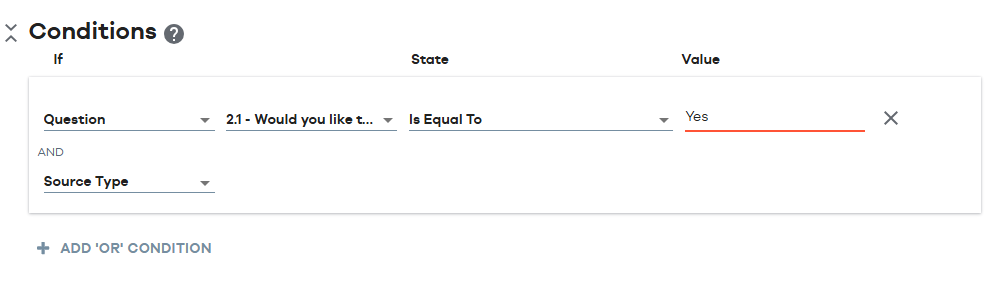
This section of the question allows you to manage the conditional appearance of the question based on either a previous response, a contact attribute or a response property. You can combine 2 or more conditions using “OR/ AND” conditions by clicking on them. Please refer to our “Quick Start: Add a Condition to a Question”.
Responses and Reports
The CAPTCHA is simply a mechanism used to verify that the user is a real person. The system does not store any details against it so it does not relect any data in Responses or Reports.
